Short-form video is no longer optional for content creators, it is the currency of modern digital engagement. Platforms like TikTok, Instagram Reels, and YouTube Shorts have completely shifted how audiences consume content, and creators are under constant pressure to produce more clips, faster, and without sacrificing quality.
This is exactly the problem OpusClip solved. By using AI to automatically identify the most compelling moments from a long video, generate captions, reframe the shot for vertical screens, and export clips ready for social media, it removed hours of manual editing from the creator's workflow. The result? OpusClip went from a niche tool to one of the most-talked-about AI video platforms in the market.
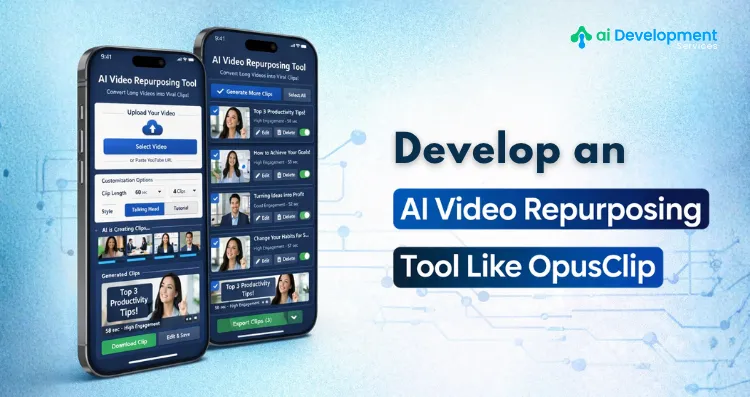
If you are a founder, product manager, or entrepreneur looking to build an AI Video Repurposing Tool like OpusClip, you are entering one of the most commercially viable spaces in AI right now. This guide walks you through every layer of that build, from core features and AI architecture to the development process, tech stack, and realistic cost expectations.
Why is the AI Video Repurposing Market Worth Entering Right Now?
Before getting into how to build, it helps to understand why the timing makes sense.
The global video editing software market is projected to exceed $2.5 billion by 2027, and AI-driven tools are capturing a disproportionate share of that growth. Content teams at brands, agencies, podcasters, course creators, and solo influencers are all dealing with the same bottleneck: they have hours of recorded content but lack the time or editing bandwidth to turn it into consistent social media output.
An AI video repurposing tool for social media clips directly removes that bottleneck. Instead of hiring an editor, a user uploads a long video, selects their target platform, and the tool handles the rest of finding highlights, generating captions, resizing the frame, and delivering clips in minutes. The value proposition is clear, the demand is validated, and the technology stack to build it has matured considerably over the last two years.
Build a Smarter AI Video Clipping Platform With Expert Help
Core Features an AI Video Repurposing Tool like OpusClip Must Have
The difference between a basic video trimmer and a true AI-powered video repurposing platform lies entirely in the intelligence of its features. Here is what the core feature set should look like:
AI-Powered Clip Detection: The engine at the heart of the product. The system analyzes the full video transcript, speaker tone, energy levels, keyword density, and audience engagement signals to automatically identify the most shareable moments. This is where the product delivers its primary value.
Automatic Speech-to-Text Transcription: Every video gets transcribed in real time or near-real time. This transcript feeds the clip detection model and also powers auto-captioning, which is non-negotiable for social media content where a large share of viewers watch without sound.
Smart Reframing and Crop-to-Fit: Long-form videos are typically recorded in 16:9 landscape format. Social platforms want 9:16 vertical. The AI must intelligently track the main speaker, detect faces, and dynamically reframe the crop so that the subject stays centered throughout the clip, regardless of movement.
Caption Generation and Styling: Auto-generated captions synced to the speaker's words, with options to customize font, color, animation, and placement. Viral content often has kinetic, word-by-word captions, and this feature should support that out of the box.
Multi-Platform Export: One clip, many formats. The tool should allow users to export with preset aspect ratios and resolution profiles for TikTok, Instagram Reels, YouTube Shorts, LinkedIn, and Twitter/X simultaneously.
Virality and Engagement Scoring: An AI-generated score that ranks clips by their estimated engagement potential. This helps users prioritize which clips to post first and gives non-editors confidence in their selections.
AI-Generated Titles and Descriptions: Using the transcript context, the tool generates punchy short-form titles, hooks, and descriptions that match each platform's best practices.
User Dashboard and Project Management: A clean workspace where users manage uploaded videos, review generated clips, edit captions, and download assets. This is where UX investment pays significant dividends in retention.
Technical Architecture: What Powers an AI Video Clipping Platform like OpusClip
Building an AI video clipping platform like OpusClip is not a single-model problem, it requires several AI subsystems working together in a pipeline. Here is how that architecture is typically structured:
Ingestion Layer: Users upload videos via the frontend. Files are stored in cloud object storage (AWS S3 or Google Cloud Storage). A job queue (using tools like Redis Queue or Celery) manages processing tasks asynchronously so the user is never stuck waiting on a loading screen.
Transcription and NLP Layer: The uploaded video is passed to a speech-to-text engine, typically OpenAI Whisper, AWS Transcribe, or Deepgram. The resulting transcript is then analyzed using NLP models to identify topics, emotional intensity, question-answer patterns, and high-retention phrases.
Clip Selection Engine: This is the most proprietary part of the system. A custom-trained or fine-tuned model scores transcript segments based on multiple signals: speaker confidence, content density, emotional peaks, and presence of quotable or shareable statements. The top-scoring segments become clip candidates.
Computer Vision Layer: FFmpeg handles the actual video cutting. A face-detection and object tracking model (commonly built on MediaPipe or a fine-tuned YOLO variant) powers the smart reframing feature by continuously identifying the primary speaker and adjusting the crop window frame by frame.
Caption Rendering: Captions are timed to word-level timestamps from the transcription layer and burned into the video or delivered as an overlay, depending on the export format. Libraries like Pillow, MoviePy, or custom FFmpeg pipelines handle rendering.
Scoring and Ranking: A secondary ML model, often trained on engagement data from real social media posts, assigns virality scores to each candidate clip. This model improves over time with user feedback, as users who post clips and report performance data help retrain the ranking model.
API and Backend: A FastAPI or Node.js backend manages user authentication, project data, processing jobs, and third-party integrations. The entire processing pipeline runs on scalable cloud infrastructure, typically with GPU-enabled instances for computer vision workloads.
Step-by-Step Development Process for AI Video Repurposing Tool Like OpusClip
Here is how the development team typically structures the build from discovery to launch:
Step 1: Discovery and Requirement Scoping
The engagement begins with a thorough discovery phase. This means mapping out the exact user journey, defining which AI models will be integrated versus custom-built, identifying the target platforms and formats, and setting scope boundaries for the MVP. Detailed technical specifications and a phased development roadmap are produced before a single line of code is written.
Step 2: UI/UX Design
Wireframes and interactive prototypes are created for every screen in the product, including the upload flow, the clip review interface, the caption editor, the export modal, and the dashboard. The design standard for this category of tool is high; users expect a clean, fast, modern experience, so design iteration happens before development begins.
Step 3: Backend Infrastructure Setup
Cloud infrastructure is provisioned. This includes setting up the database (PostgreSQL for relational data, Redis for caching and queues), object storage for video files, and container orchestration (Docker and Kubernetes) to manage the AI processing workloads at scale. CI/CD pipelines are configured at this stage.
Step 4: AI Pipeline Development
This is the most technically intensive phase. The speech-to-text integration is set up and tested. The NLP clip-scoring model is either integrated via API or fine-tuned on a domain-specific dataset. The computer vision reframing module is built and calibrated. The caption rendering pipeline is assembled. Each component is tested independently before being connected into the full processing chain.
Step 5: Frontend Development
The React or Next.js frontend is built against the finalized designs. The video player component, the clip timeline editor, the caption customization panel, and the export settings UI are all built and connected to the backend APIs. Real-time progress indicators keep users informed while their video processes.
Step 6: Integration and End-to-End Testing
The full pipeline, from video upload to clip download, is tested under realistic conditions. Load testing ensures the infrastructure handles concurrent users. Edge case testing covers videos with multiple speakers, poor audio quality, non-English content, and unusual aspect ratios.
Step 7: Beta Release and Feedback Loop
A closed or open beta is launched with a select user group. Feedback on clip quality, processing speed, caption accuracy, and UX pain points is collected systematically. The AI models are retrained or adjusted based on real usage data before the public launch.
Step 8: Launch and Iteration
The product goes live. Post-launch, the team monitors processing error rates, user retention patterns, and feature adoption metrics. New capabilities, such as multi-language support, brand kit integration, or social scheduling, are prioritized for subsequent sprints.
Tech Stack Overview for AI Video Repurposing Tools Like OpusClip
The following technology choices represent a production-ready stack for a platform of this nature:
Frontend: React.js or Next.js, Tailwind CSS, video.js for playback
Backend: FastAPI (Python) or Node.js with Express
AI/ML: OpenAI Whisper (transcription), spaCy or Hugging Face Transformers (NLP), MediaPipe or YOLO (face tracking), PyTorch or TensorFlow (custom model training)
Video Processing: FFmpeg, MoviePy
Cloud Infrastructure: AWS (EC2, S3, Lambda, SageMaker) or GCP (with GPU instances for processing)
Database: PostgreSQL, Redis
DevOps: Docker, Kubernetes, GitHub Actions
If you are also thinking about how the broader cost of AI app development maps to this build, the AI app development cost guide on AI Development Service breaks down budget ranges by feature complexity and team structure, useful context before you finalize your project scope.
Cost to Build an AI Video Clipping Platform like OpusClip
Cost depends heavily on feature depth, the number of AI models involved, and whether you are building an MVP or a full-scale product. Here is a general framework:
MVP (core clip extraction, basic captions, single export format): $5,000 - $10,000
Mid-tier product (smart reframing, multi-platform export, virality scoring, dashboard): $10,000 - $25,000
Full-scale platform (custom-trained models, multi-language, brand kits, analytics, API access): $25,000 - $40,000+
Development timelines typically range from three to four months for an MVP to eight to twelve months for a fully featured platform. Ongoing infrastructure costs, including cloud compute, GPU processing, and storage, vary by usage volume but should be factored into your unit economics from day one.
For a detailed breakdown of what influences these numbers, including how generative AI development components like caption generation and transcript summarization affect the total budget, exploring cost-specific resources before scoping your project is strongly recommended.
Monetization Models for Your AI Video Platform like OpusClip
Sustainable revenue architecture is something to design early, not retrofit. The most common and effective models for this category:
Subscription Tiers: A free plan with limited exports per month, then paid tiers (Starter, Pro, Business) with increasing clip limits, export quality, and feature access. This mirrors OpusClip's own pricing model and is the standard for SaaS tools in this space.
Usage-Based Credits: Users purchase processing credits that are consumed per minute of video processed. Works well for occasional users who want flexibility without a monthly commitment.
White-Label Licensing: Agencies and media companies pay a licensing fee to embed the tool under their own brand. High margin, high contract value.
API Access: Developers and enterprise customers pay for API-level access to the clip extraction engine. This opens a B2B revenue layer alongside the B2C subscription business.
Challenges to Anticipate and How to Address Them
Processing Latency: AI video processing is compute-intensive. Invest in asynchronous job queues and clearly communicate processing time to users through progress indicators. Consider priority queues for paid plans.
Clip Quality Variance: The AI will not always select the "best" clips by human standards, especially early in the product lifecycle. Build an easy clip rejection and manual selection flow so users stay in control. Use rejection signals to retrain the model.
Multi-Language Support: If your target market is global, transcription accuracy varies significantly by language. Plan this as a phased feature rollout rather than a day-one requirement.
Storage Costs at Scale: Video files are large. Implement automatic purge policies for processed videos and give users clear expectations about how long their content is stored. Tiered storage (hot vs. cold) keeps infrastructure costs manageable.
Why AI Development Expertise Matters Here?
Building a video clipping platform like OpusClip is not a standard web application project. It requires genuine expertise across machine learning engineering, computer vision, cloud infrastructure, and product design simultaneously. Choosing a development partner who has built production-grade AI systems, not just integrated third-party APIs, is the difference between a product that actually delivers accurate clips and one that frustrates users into churning.
AI Development Service specializes in end-to-end AI product development, from model architecture decisions through to scalable cloud deployment. If you are evaluating whether to build in-house or partner with a specialist team, their work across adaptive AI development and generative AI development projects in the media and content space is worth reviewing.
Let's Build Your OpusClip-Like Platform From Scratch
Frequently Asked Questions
Q1. How long does it take to build an AI video repurposing tool like OpusClip?
An MVP typically takes three to four months. A full-featured platform with custom AI models, multi-platform export, and analytics can take eight to twelve months depending on team size and feature scope.
Q2. Do I need to train my own AI models or can I use existing APIs?
For an MVP, existing APIs for transcription and NLP (like OpenAI Whisper and GPT) are sufficient and cost-effective. Custom model training becomes worthwhile once you have enough usage data to improve clip accuracy beyond what off-the-shelf models provide.
Q3. What is the most technically complex part of building this tool?
The smart reframing (auto-crop) and clip-scoring engine are the most technically demanding components. They require computer vision expertise and continuous improvement loops based on real user feedback.
Q4. Can AI Development Service build a custom AI video repurposing platform for my business?
Yes, AI Development Service has experience building AI-powered media tools from the ground up, including clip extraction pipelines, caption automation, and scalable video processing infrastructure. You can reach out directly for a scoped estimate based on your specific requirements.
Q5. How much does cloud infrastructure cost to run an AI video platform?
At early scale (hundreds of users), cloud infrastructure typically costs $500–$2,000/month. As usage grows, costs scale with processing volume. GPU instances for video AI workloads are the primary cost driver, which is why efficient job queuing and caching matter.
Q6. What monetization model works best for an AI video clipping platform?
A freemium subscription model with usage-based limits on the free tier and escalating paid tiers is the most proven approach. Layering in API access for developers and white-label options for agencies can significantly increase revenue per account.
Q7. Can AI Development Service help if I only need specific AI components built, like the clip scoring engine or captioning module?
Absolutely, the team at AI Development Service can work on modular scopes, whether you need a standalone AI clip detection engine integrated into your existing product or a complete platform built from scratch. They offer flexible engagement models to match your stage and budget.